Updated External Email Warning Banner in Outlook
Dear University of Miami Community,
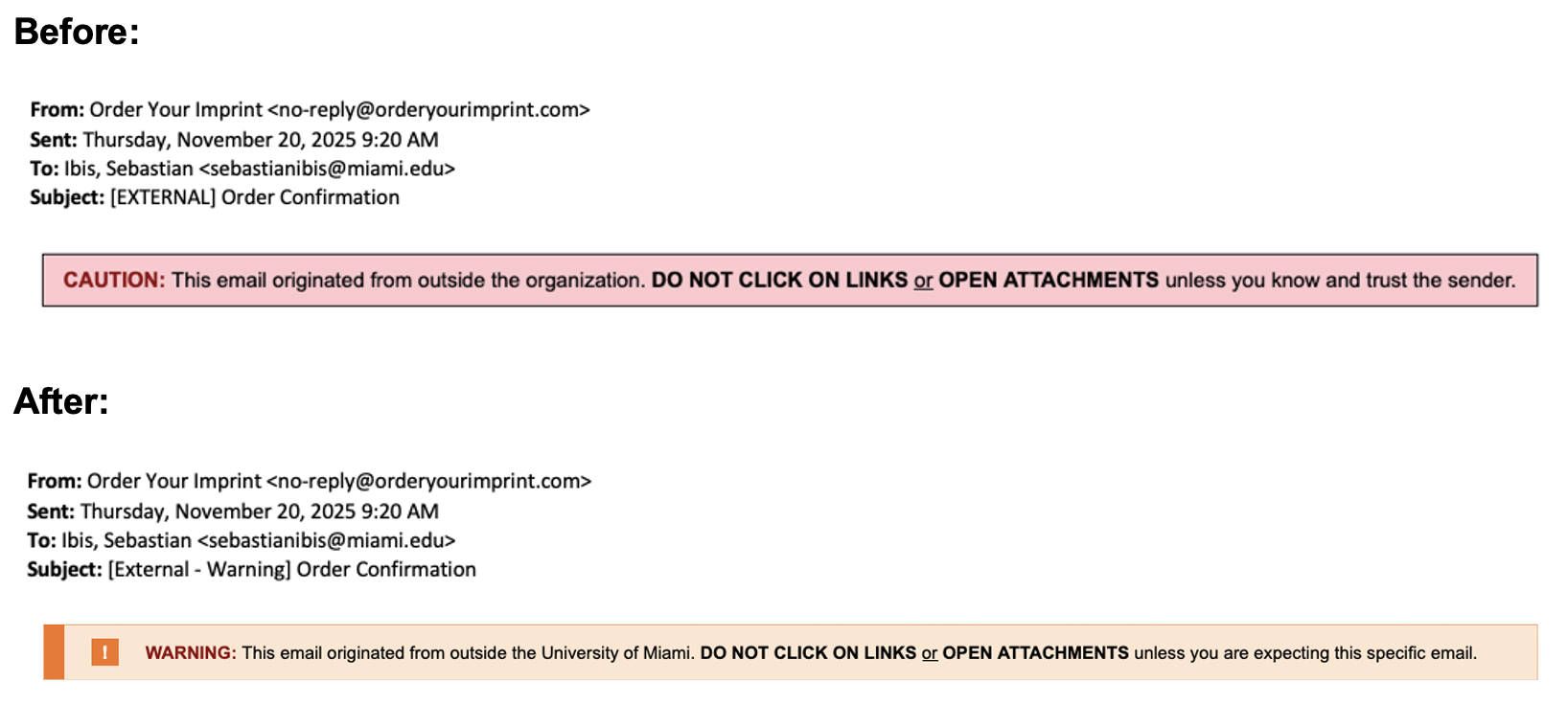
As part of our ongoing commitment to protect our community from phishing and other email‑based threats, the University of Miami (UM) has updated the external email subject line and warning banner that appears on emails originating from any non-UM email address.
Beginning Thursday, March 19 at 5 p.m., you will start seeing the updated subject line and newly redesigned external email warning banner in Outlook. While the message remains similar, the updated design and wording is more visible, modern, and easier to recognize at a glance.
|
|
|
|
Why this update matters:
These enhancements are intended as a precaution to protect both you and the University, since malware and phishing attacks from external senders can spread rapidly and potentially compromise our entire network.
The updated subject line and banner provide a refreshed visual signal to:
- Pause and confirm the legitimacy of emails coming from outside UM.
- Avoid clicking links or opening attachments unless you trust the sender and expect the message.
- Verify that messages claiming to come from UM departments or leadership are not actually external impersonations.
- Report suspicious emails by using the "Report Phish" button or forward them to phish@miami.edu.
If you have any questions or concerns, please contact the IT Service Desk—available 24 hours a day, 7 days a week.
Thank you for your continued vigilance in keeping the University of Miami secure.
|
|
|
|