AI @ UM: Artificial Intelligence Newsletter for the UM Community
|
|
|
|
Practical AI tips, tools, and stories for faculty, staff, and students.
|
|
|
The AI-generated image above was created using Copilot chat and the following prompt: "Create an image titled 'AI @ UM - August 2026' that visually showcases Copilot for Microsoft 365's Cowork Agent and Gemini Notebook as this month's highlights. Use minimal additional text. Focus on visual elements that relate to faculty, staff, and students in a stylized illustration. Brand the image with the University of Miami's colors, but do not use the University logo." Read on to learn how you can also quickly do this, and much more, with the variety of University-supported AI tools available to you!
|
|
|

|
|
August 2026
What's New:
Copilot Cowork Is Here!
Copilot for Microsoft 365 has always been great at answering questions. Cowork takes the next step by helping you get work done.
With Cowork, you can create Word documents, PowerPoint presentations, Excel analyses, research reports, emails, and more using information you already have access to in Microsoft 365. Instead of providing guidance alone, Cowork can produce actual deliverables for you to review and refine.
Two powerful features make Cowork especially useful:
- Skills let you save instructions for recurring work, such as meeting summaries, reports, or preferred document formats.
- Automations can run routine tasks on a schedule, such as morning briefings or weekly status updates.
Cowork is currently available to full-time faculty and full-time staff, and requires opting in to the University's Copilot for M365 program. If you haven't opted in, do that first—Cowork won't appear until you have.
|
Here's a Cowork prompt example: "Review the last three months of emails and Teams messages about our fall enrollment project, then build me a one-page status summary in Word and a short deck for Friday." Instead of advice, you get the actual documents, ready to review.
|
Full details, policies, and getting-started steps are available on the Copilot's Cowork Agent page.
Copilot for Microsoft 365 is Now Open to All Students
Copilot for Microsoft 365 (M365) is now available to all University of Miami students, joining full-time faculty and full-time staff who already have access through the University's opt-in program.
Whether you're teaching, learning, researching, collaborating, or managing daily work, Copilot for M365 can help you save time, enhance productivity, and work more efficiently.
By opting in, you'll gain access to enterprise-protected Copilot Chat as well as Copilot in Word, Excel, PowerPoint, and Teams, all backed by the University's privacy, security, and compliance safeguards for institutional data.
If you haven't opted in yet, now is the perfect time! Request access, and please allow 1-3 business days for your license to be provisioned after opting in.
|
|
|

|
Gemini Notebook (NotebookLM):
Your AI Study and Research Partner
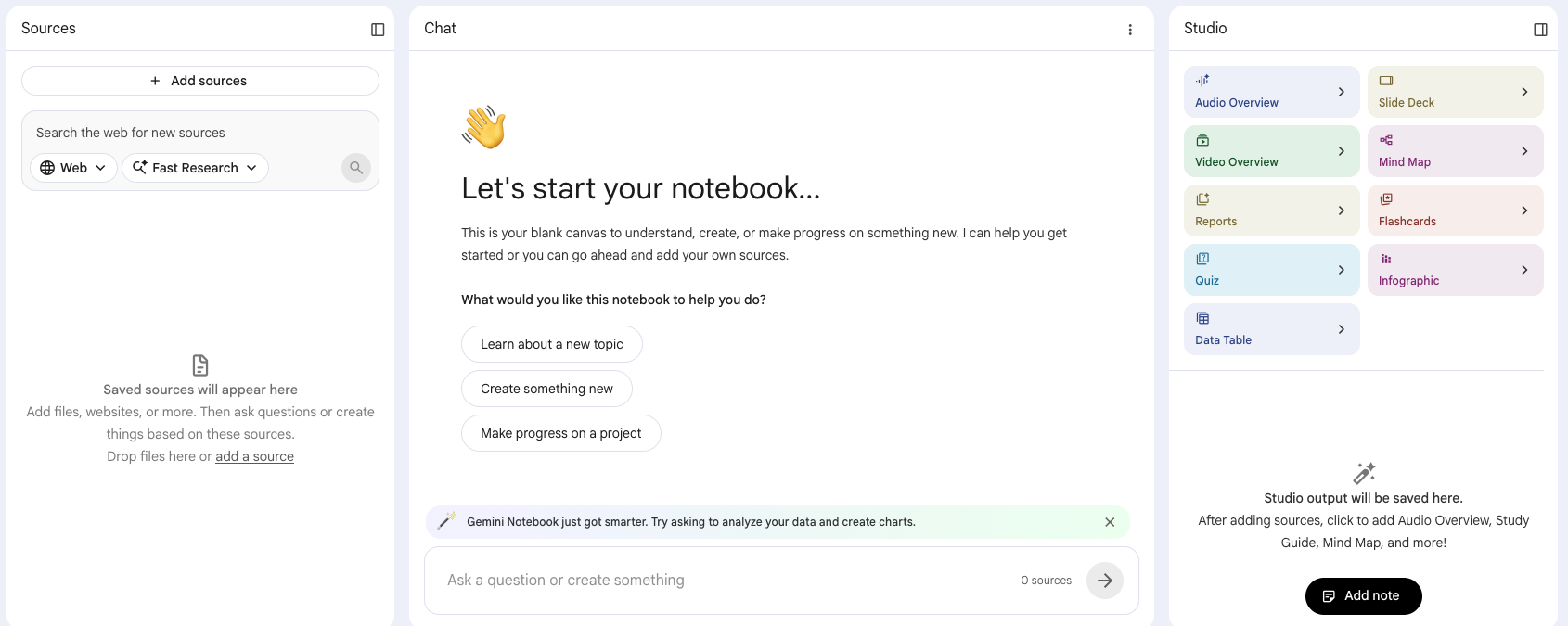
Unlike traditional AI tools that draw from broad internet knowledge, Gemini Notebook (NotebookLM) works exclusively with the sources you provide.
Upload lecture slides, readings, notes, research articles, meeting materials, and more, and it can answer questions, generate study materials, and help you explore your content with citations that link directly back to the original source.
Available to all UM faculty, staff, and students through the University's Google Workspace for Education Plus license, Gemini Notebook provides a secure way to learn, research, organize information, and generate insights from your own materials.
Gemini Notebook's supported sources:
Word docs, PowerPoint slides, Excel sheets, Google Docs/Slides/Sheets, PDFs, text files, web URLs, YouTube links (it reads the transcript), audio files (MP3/WAV), and copy-pasted text.
|
|
|
|
|
What Gemini Notebook can create:
- Study guides, flashcards, and practice quizzes, generated exclusively from your sources.
- Audio overviews, which are a podcast-style discussion between two AI hosts about your material, with brief, critique, and debate formats.
- Video overviews, which are explainer videos that pull in images, diagrams, and quotes from your documents.
- Mind maps and infographics that show how concepts across your sources connect.
- Briefing docs, outlines, reports, and FAQs with talking points and supporting evidence.
- Guided learning, which is a mode built to deepen understanding rather than just hand you the answer.
Five ways to use Gemini Notebook this semester:
|
|
|
|
Students
- Turn lectures into a podcast. Upload slides and recordings to create an Audio Overview you can listen to anywhere.
- Build study guides and practice quizzes. Generate course-specific review materials from your notes, readings, and syllabus.
- Simplify research. Upload articles (PDFs) and quickly identify key themes, evidence, and differing viewpoints with citations.
- Catch up on missed classes. Use lecture materials to review key concepts and identify what to focus on next.
- Organize group projects. Combine research and notes into one notebook, then generate outlines, mind maps, and presentation ideas.
|
|
|
|
Faculty
- Create study aids from course materials (e.g., syllabus). Generate key terms, discussion questions, quizzes, and prompts directly from assigned content.
- Compare textbooks more efficiently. Analyze multiple texts to identify similarities, differences, and coverage of learning objectives.
- Search committee records instantly. Upload agendas, minutes, and recordings to quickly find decisions, action items, and open topics.
- Jump-start proposal writing for grants and more. Use previous submissions and supporting materials to generate outlines and key talking points.
- Review literature faster. Analyze collections of articles to identify trends, gaps, and conflicting perspectives, all with source citations.
|
|
|

|
Upcoming Events and Workshops:
Fall 2026 Copilot Lunch and Learn Sessions
Join the Fall 2026 line-up of Copilot Lunch and Learn sessions!
These sessions explore the latest Copilot for Microsoft 365 capabilities and are designed to help you get more from Copilot and bring AI-powered efficiency to your daily work.
|
Session
|
Description
|
|
Thursday, August 27 at 12 p.m. EST
First-Party Agents (Researcher & Analyst)
Watch the Recording
|
Discover how Microsoft's Researcher and Analyst agents can help you conduct research, analyze data, uncover insights, and accelerate decision-making using AI directly within Microsoft 365.
|
|
Thursday, August 27 at 3 p.m. EST
Microsoft 365 Roadmap
Watch the Recording
|
Recap and forward look at the Microsoft 365 roadmap, emphasizing changes relevant to end users and IT decision makers. |
|
Thursday, September 10 at 12 p.m. EST
Agentify Your Business Processes
Register Now!
|
Learn how to leverage Microsoft Copilot and Copilot Studio to automate tasks, streamline workflows, and create AI-powered agents that help your teams work more efficiently and focus on higher-value activities.
|
|
Thursday, September 24 at 12 p.m. EST
Choosing the Right Copilot Model
Register Now!
|
Explore Microsoft's AI-powered Copilot experiences and learn when to use M365 Copilot, Researcher, Analyst, Copilot Studio, and custom agents to achieve the best outcomes for your work.
|
|
Thursday, September 24 at 3 p.m. EST
Microsoft 365 Roadmap
Register Now!
|
Recap and forward look at the Microsoft 365 roadmap, emphasizing changes relevant to end users and IT decision makers.
|
|
Thursday, October 1 at 12 p.m. EST
Meet Cowork: Your AI Team of Experts
Register Now!
|
Discover how Copilot's Cowork brings together specialized AI agents to help you research, create, analyze, and solve complex tasks faster. Learn practical ways to enhance productivity and work smarter with AI.
|
In addition, we invite you to join the University of Miami's AI enablement team for open office hours designed to support and inspire our community's exploration of AI.
Whether you're a student, faculty member, researcher, or staff, this is your opportunity to engage directly, ask questions, and share your thoughts on how AI can shape our future.
|
|
|

|
The Art of Calm:
How AI Is Bringing Custom Digital Art to UHealth Spaces
Walk past the lobby video wall at UHealth's Doral or SoLé Mia medical centers and you might catch a wave rolling across pale sand, morning light drifting over the Everglades, or a mountain stream easing into a still lake. None of it was filmed.
Every scene is AI-generated and custom-built by the University of Miami ITS AI team as part of "The Art of Calm," an initiative designed to replace licensed video content with visual experiences created specifically for each environment.
|
|
|

|
|
Getting there wasn't as simple as typing a prompt. The AI team tackled unexpected technical challenges—from clips that drifted or flickered to objects that subtly changed shape—while working closely with stakeholders to translate a feeling like "calm" into a visual experience. The result: custom content for Doral and SoLé Mia, a recurring annual licensing expense eliminated, a repeatable process that can expand to new locations, and positive responses from the patients, families, and staff who experience the videos each day.
Read the full story to see what it took to bring "The Art of Calm" to life:
|
|
|

|
|
More AI-related tips, training opportunities, and community highlights will be shared in future editions of the AI newsletter. If you haven't already done so, sign up to receive the AI newsletter directly in your inbox:
If you're curious about how AI can support your team, we encourage you to explore, experiment, and join our office hours.
If you have any questions, contact us at ai@miami.edu.
|
|
|
|